
Thermowell Calculations
Simple to start.Detailed when you need it.
Quick to start. Built to go deeper.
Begin with the process and drawing values you know. Bring in advanced material, fatigue, pressure and applicability detail only when the design needs it.
Quick guided setup
Process, fluid, connection, geometry and material inputs follow one clear sequence.
The first pass stays focused on the essential information needed to understand the proposed design.
Get to a useful preliminary design view without beginning in the deepest engineering detail.
Wake-frequency detail
Natural frequency, Strouhal frequency, frequency ratio, Scruton number and in-line resonance velocity remain available.
Begin with the design outcome, then inspect the excitation and resonance path when you need to go deeper.
See whether geometry, velocity or another input is driving the vibration result without changing tools.
Stress and fatigue checks
Steady-state, oscillating and equivalent stress checks use the same design and service data.
Stress concentration, fatigue detail and resonance effects stay linked to the same proposed geometry.
Open the mechanical detail when the design needs more than a quick screening view.
Relevant pressure checks
Stem, tip and, where applicable, flange pressure limits are shown with the governing rated pressure.
The selected connection controls the relevant mounting and pressure path within the same workflow.
Avoid unrelated flange fields and see which part of the proposed construction governs pressure capacity.
Materials when needed
Temperature-dependent material properties are selected automatically, with a separate expert override for verified project-specific data.
Start with a provisional basis, then add confirmed project values when a detailed assessment requires them.
Keep the first pass moving without losing access to the material detail needed later.
Clear result and next step
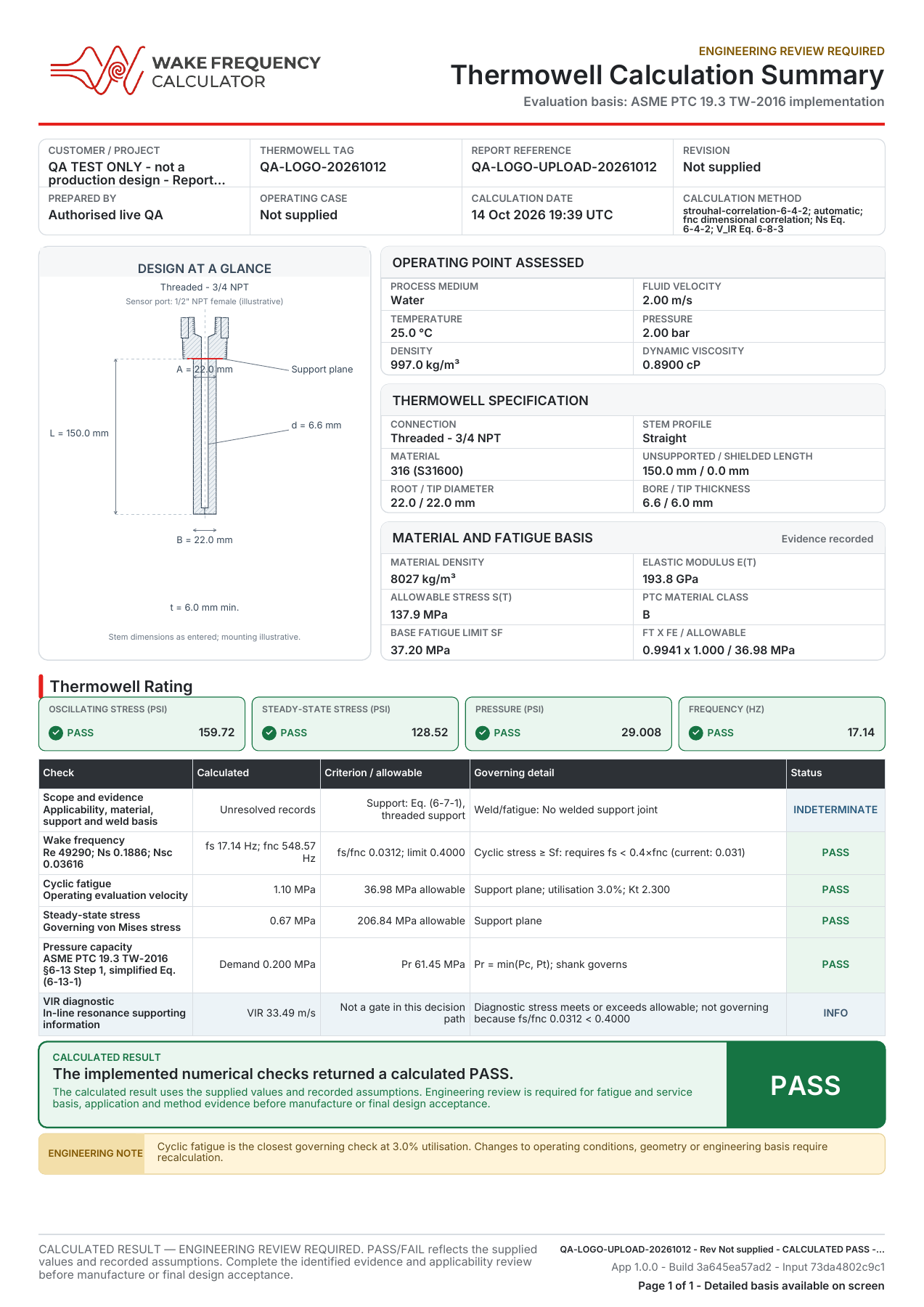
A prominent calculated PASS or FAIL is paired with a separate engineering-readiness status and report export.
The outcome distinguishes the performed calculation from missing engineering evidence or an unsupported method condition.
See the calculated answer immediately, then know exactly what must be confirmed before engineering use.
Start with the essentials. Open the engineering detail when needed.
A focused first pass keeps routine calculations moving. The material, fatigue, pressure and applicability controls remain available in the same design when a complete assessment is required.
Quick design view
Enter the essential process, connection and geometry values to screen the proposed design and explore how changes affect it.
Detailed assessment
Add the material, fatigue, pressure and applicability information needed to complete the engineering basis without starting the calculation again.
Open the vibration detail
The technical depth is ready when you need to understand what is driving the result.
- Natural frequency, Strouhal frequency, frequency ratio and resonance velocity
- Applicability limits are clearly flagged when a correlation is unsupported
- Compare straight, tapered and stepped stem profiles on one calculation basis
See what governs the design
Stress, fatigue and pressure stay separate so the limiting check is easy to identify.
- Pc, Pt and, where applicable, Pf shown with the governing Pr
- Stress concentration, dynamic magnification and equivalent stress remain reviewable
- Missing engineering inputs remain visible in the separate engineering-readiness status
Start simple. Go as deep as the job demands.
One guided workflow for quick design checks and detailed engineering assessment.
Insights & guides
Practical help with drawing inputs, calculation results and the evidence behind an assessment. Read without an account.
How to start a thermowell wake-frequency calculation
A practical walkthrough of the process inputs, thermowell drawing details and report workflow in Wake Frequency Calculator.
Thermowell unsupported length and insertion length explained
Identify the support plane, distinguish unsupported and shielded length, and check the drawing dimensions before entering a thermowell wake frequency calculation.
Thermowell wake frequency calculation: a practical guide
Understand the inputs, frequency, stress and pressure checks in a thermowell wake frequency calculation, and what to do with the result.
For the calculation basis and its limits, read our methodology and validation overview.